
Built inside a real operation.
Asset Science has been delivering mobile device diagnostic solutions since 2010, with daily users across Africa, the Americas, Asia, and Europe. We partner with OEMs, wireless carriers, buyback and insurance appraisers, and reverse logistics factories to improve testing accuracy and boost customer satisfaction.
Who we work with.
What the platform does.
Three capabilities that run on the same floor, on the same device, in the same session.
In-Factory
Optimize your process with solutions designed to address the challenges of the factory environment. Our real-time data tracking and analysis tools give you unparalleled control over your factory floor, so you can reduce your bounce rate and boost customer satisfaction in the process.
Our cloud platform lets you manage your data and shop-floor flow, ensuring full control over device throughput. Create your own testing sequences and routes, and integrate with Zebra printers and scanners for custom workflows at every stage — receiving, data cleaning, diagnostics, cosmetic grading, and shipping. A true door-to-door solution.
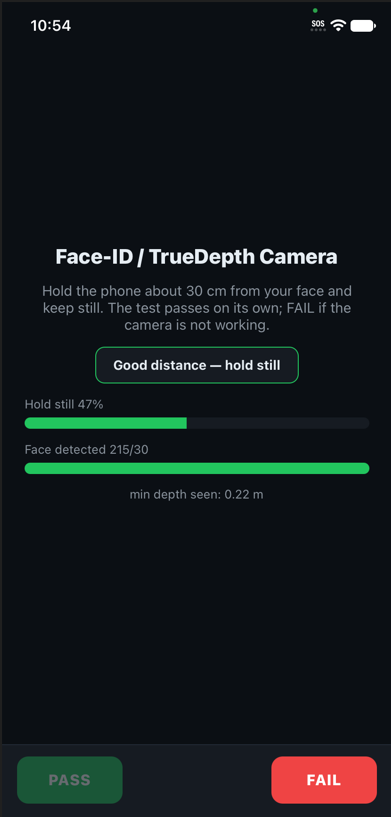
Diagnostics
133 tests on Android and 83 on iOS, run as automatic tests that proceed in the background and guided tests the operator works through. Coverage spans iPhone, iPad, Android phones and tablets — more than 7,000 Android models, and 90 iOS models across 4,500 variants.
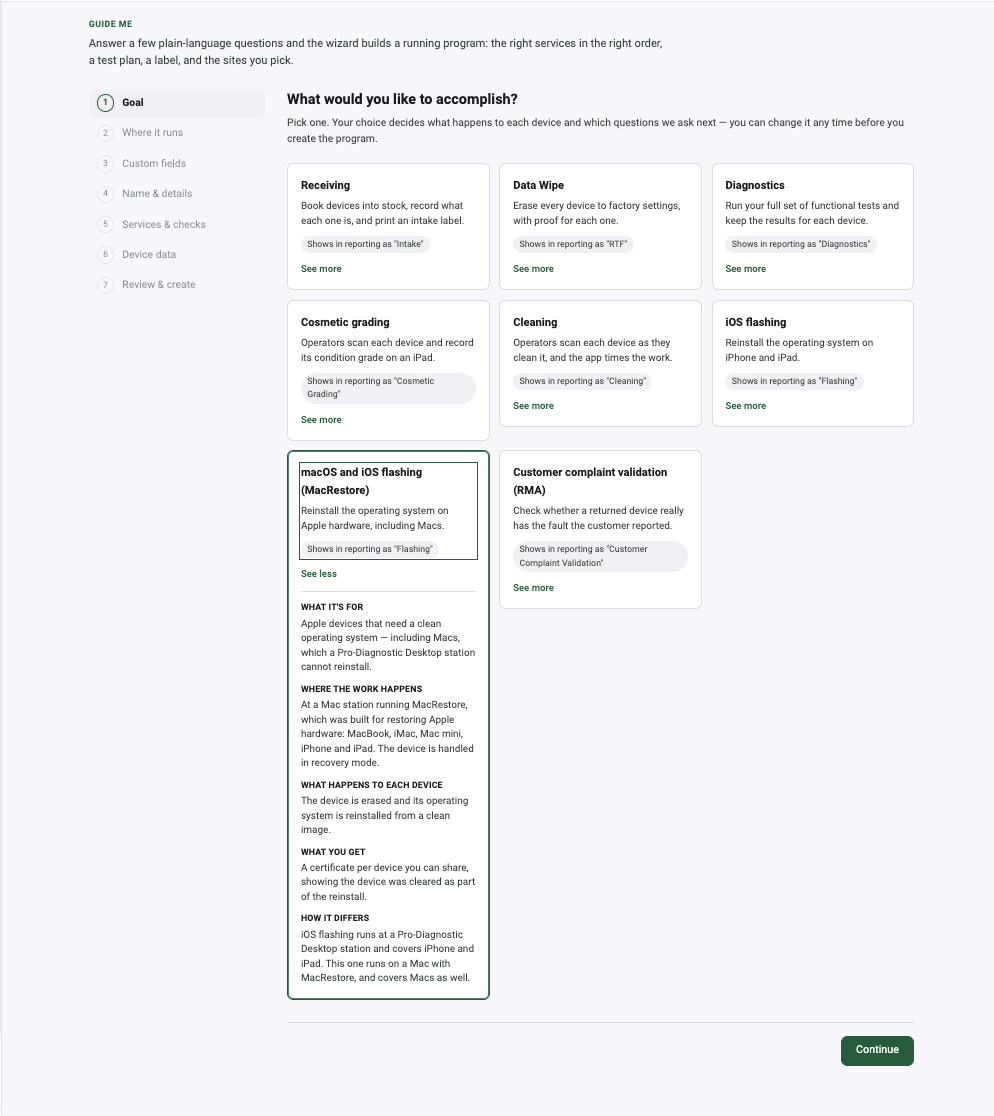
Data Cleaning
Our cross-platform system runs on Windows and Mac. Pro-Diagnostics and MacRestore are certified to ADISA assurance level 4 and NIST 800-88 compliant, covering iOS, macOS, and Android. Certificates are provided in PDF format — individually, in batch, or via API.
How do you know the operator is doing the job and not guessing?
Every refurbisher has the same unanswerable question. A grader who marks everything B gets through more units than a grader who looks. Reviewing a sample of finished work tells you what somebody did when they knew it would be checked. It does not tell you what they do the rest of the time.
Audits are tests where the result is staged in order to evaluate the reliability of an operator. These percentages define the ratio of audits to real tests that operators will be tasked with, for each operator audit status.
An audit is a test whose result the platform already knows. It is slipped into the operator’s normal queue, on a normal device, and it is indistinguishable from real work. The operator cannot prepare for it, because they cannot see it coming, because there is nothing to see.
The ratio is set per operator audit status, not per operator and not per floor. A new hire is audited heavily. An operator who has been getting them right is audited less. That happens on its own, from the policy you set once — nobody maintains a list.
Same queue, two operators, two ratios.
New operator
4 of 20 runs in this stretch were staged audits. Early on, the platform is still establishing whether this person can be trusted with the grade.
Proven operator
1 of 20 runs were staged. The checking never stops; it just stops costing throughput once the record supports it.
Operation Management → Audits
Audit policy is set per facility, against the facilities you select. A site that has just opened and a site that has run for four years do not need the same rate.
Test Suite Builder → Suite behavior → Advanced
Operator audits are a 0–5 setting on the suite itself, beside fail-code display, device support level and rapid test. A suite where the stakes are high is audited harder than one where they are not.
Then it turns into a number you can act on.
Audits are not a filing exercise. They surface in the same place the floor is already being measured, next to throughput, so the trade-off between speed and accuracy is visible rather than argued about.
- Audit pass rate, in the KPI band
- Sitting beside Processed, Pass rate and Avg UPH on the Performance Dashboard, for whatever slice of the floor you have filtered to.
- Audited, and defects found
- Counted together, because the second number is the one that matters. An audit programme that never finds anything is not reassuring; it is badly configured.
- Audit-fail % per operator, in Explore
- A column in the drill table, down to service suite and team — exportable with the other 46.
- Top failed audits
- In the failure drill-down, beside top fail reasons and top failed tests. Which audits people miss tells you what to train.
And it refuses to let you compare unfairly.
Put two operators side by side at different audit levels and the platform says so before it draws the chart:
These operators are at different audit levels — a performance gap is expected.
A more audited operator spends a measurable share of their shift on staged work. Comparing their throughput to a less-audited colleague’s without saying so would be a lie the software told you, and it will not tell it.
Audits by test are available for today only — the per-test audit breakdown is a live view of the current day, not a historical archive. And an audit measures operator reliability, not device condition: it tells you whether the person can be trusted with the call, not whether this particular phone is an A or a B.
The floor by the hour, in the facility's own time.
Most platforms report what happened yesterday. The Performance Dashboard is a day-focused floor-monitoring surface: it shows the shift you are standing in, against the shift you want to beat.
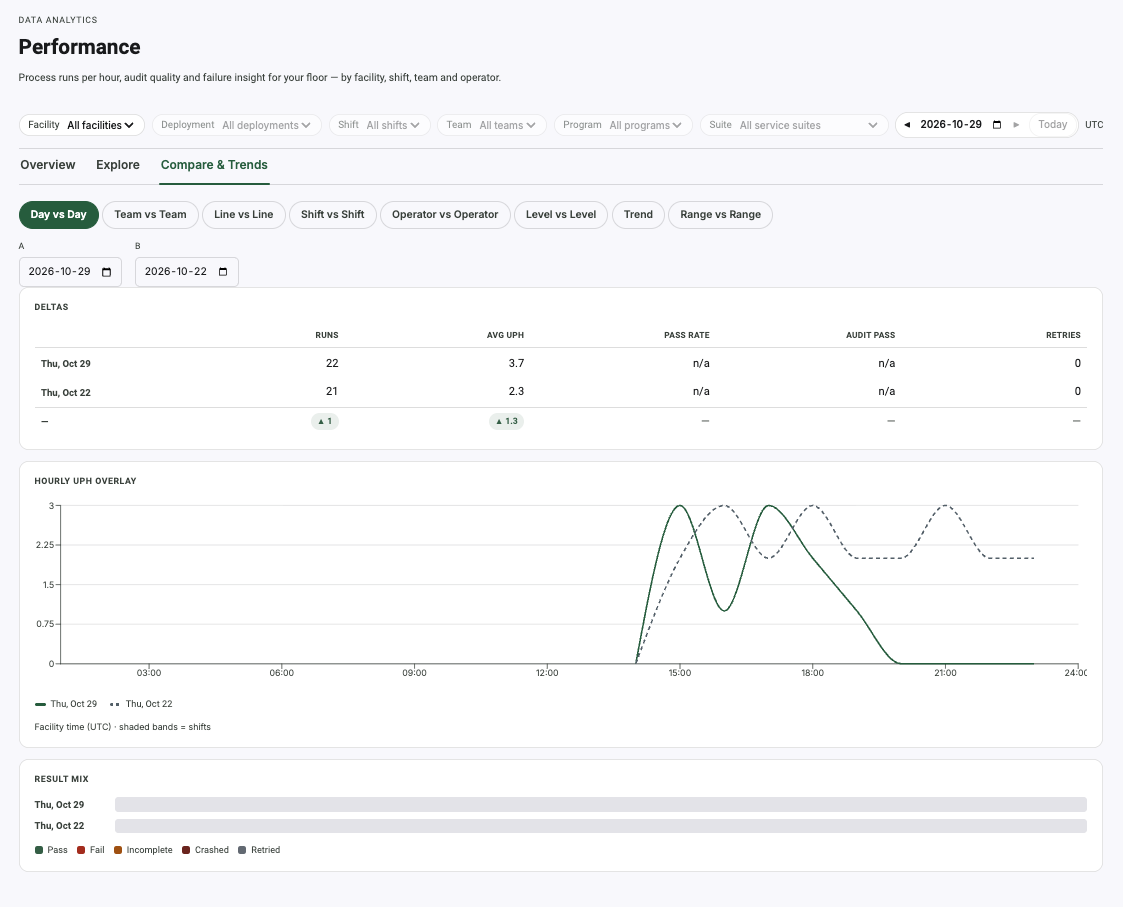
The chart is drawn in the facility’s timezone, with its shifts on it.
A facility carries its own timezone, and the chart respects it. Shifts are shaded straight onto the hourly plot, so a dip at 02:00 is read against the shift that was actually working at 02:00 — not against a head-office clock.
Facility time (tz) · shaded bands = shifts
avg N UPH · weighted by active hours
The product’s own captions. The average is weighted by active hours, so an hour with two operators on the floor does not count the same as an hour with twenty.
Seven numbers, above everything else
Processed
Process runs completed in the window.
Pass rate
Share of those runs that ended in a pass.
Avg UPH
Units per hour, weighted by active hours.
Current UPH
The rate the floor is running at right now.
Audit fail
Staged audits the operator got wrong.
Retries
Devices that had to go round again.
Incomplete
Runs that never reached a result.
Filtered by facility, deployment, shift, team, program and service suite — every one of them, at once.
Eight ways to ask whether this is good.
A throughput number on its own is not information. Every mode below is a comparison the dashboard will draw for you, against the same hourly axis.
- Day vs Day
- Was today better than the same day last week?
- Range vs Range
- Is this month ahead of last month?
- Team vs Team
- Which team is carrying the floor?
- Shift vs Shift
- Does nights hold up against days?
- Line vs Line
- Is one line the bottleneck?
- Operator vs Operator
- Who needs training, and on what?
- Level vs Level
- How do new operators compare with proven ones?
- Trend
- Which way is any of this moving?
Then it tells you why.
A pass rate that dropped four points is a question. The drill-down is the answer, and it goes down to the individual test definition and the fail code the operator picked.
Top fail reasons
Ranked by your own fail categories, in the priority order you configured them.
Top failed tests
The individual test definitions failing most often, so a bad batch and a bad fixture look different.
Top failed audits
Which staged audits operators are missing — the shape of the mistake, not just its rate.
Fail codes and custom fields
Failure counts sliced by the codes your operators pick and the fields you defined for your own programs.
A grid you work in, not a report you request.
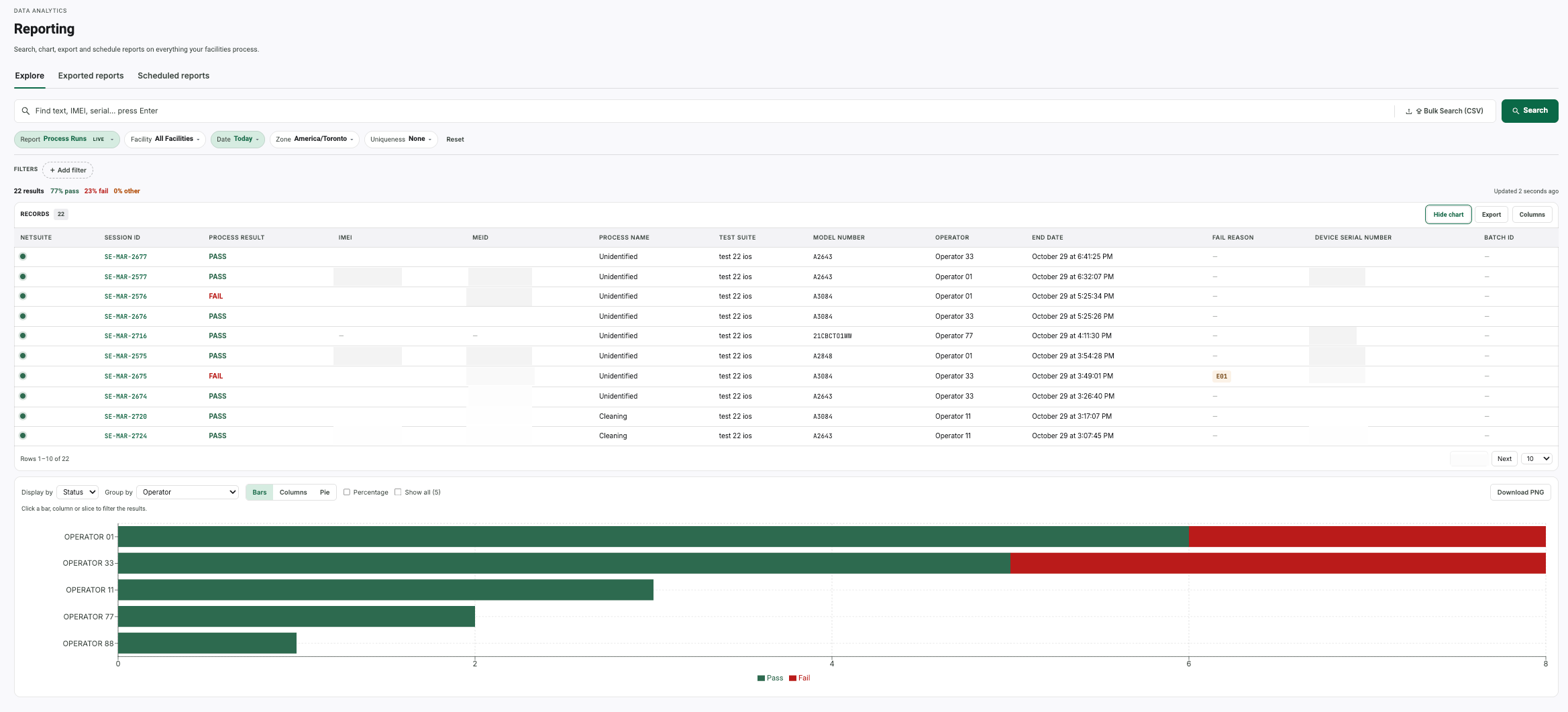
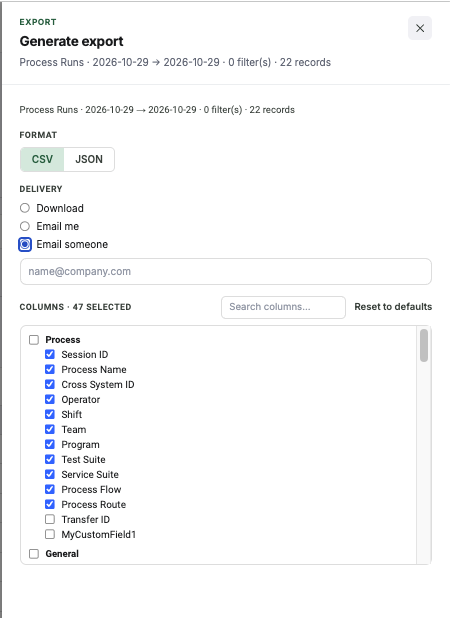
Explore is the live record table: filter it, chart it from the grid, search a CSV of identifiers against it, and export the result in 47 columns — or put it on a schedule and stop asking.
Put it on a schedule and stop asking.
Any report you can build in Explore can be scheduled: every day, on the 1st, on the 15th, or on weekdays only — generated at a run time you pick and emailed to a list. Finished exports keep for 30 days in the Exported reports tab, with their row count and status, so a report nobody opened is still there when somebody asks for it.
- Bulk device lookup
- Paste or upload a CSV of identifiers and get the matching records back as a grid. The question “what happened to these 400 devices” is one file, not four hundred searches.
- Chart from the grid
- Group the rows you are already looking at by operator, status or any other column, as bars or a donut, and click a bar to filter the grid to it.
- Same data over the API
- Full CSV and REST export on every plan. Nothing in the grid is held back for a higher tier.
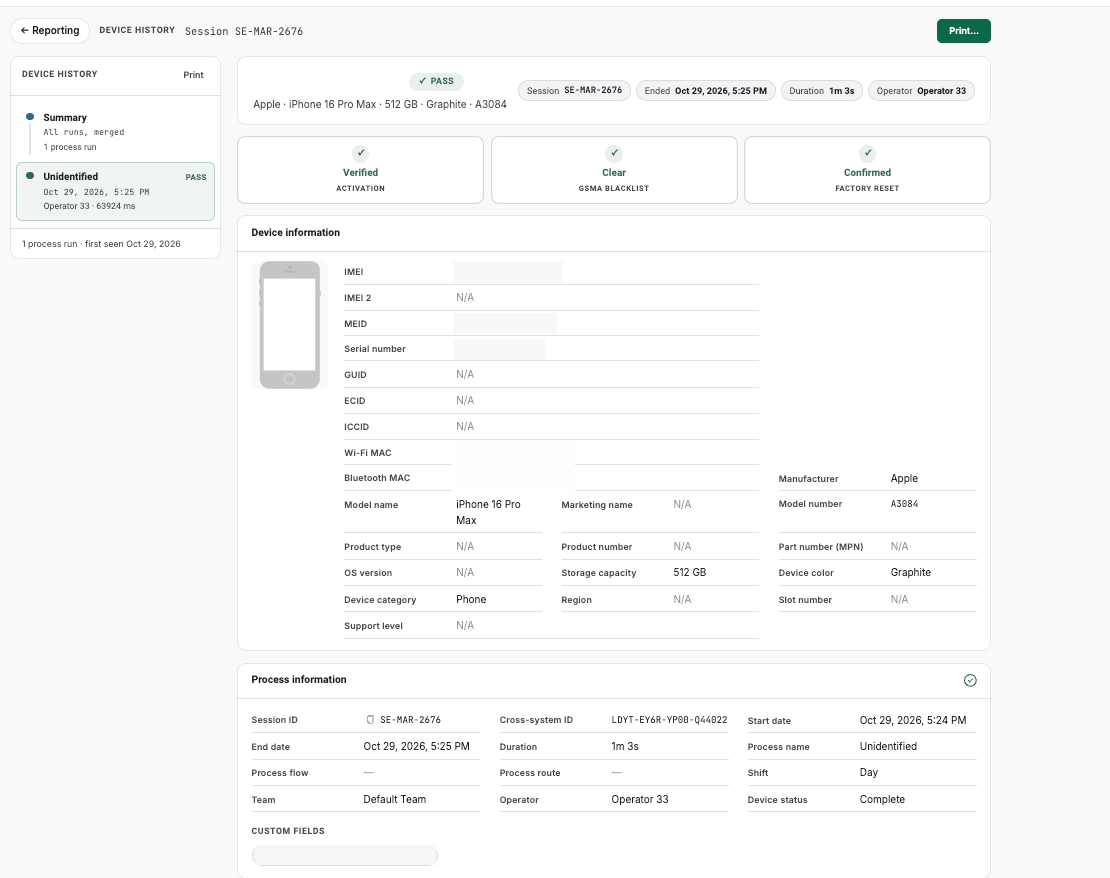
And then down to one device.
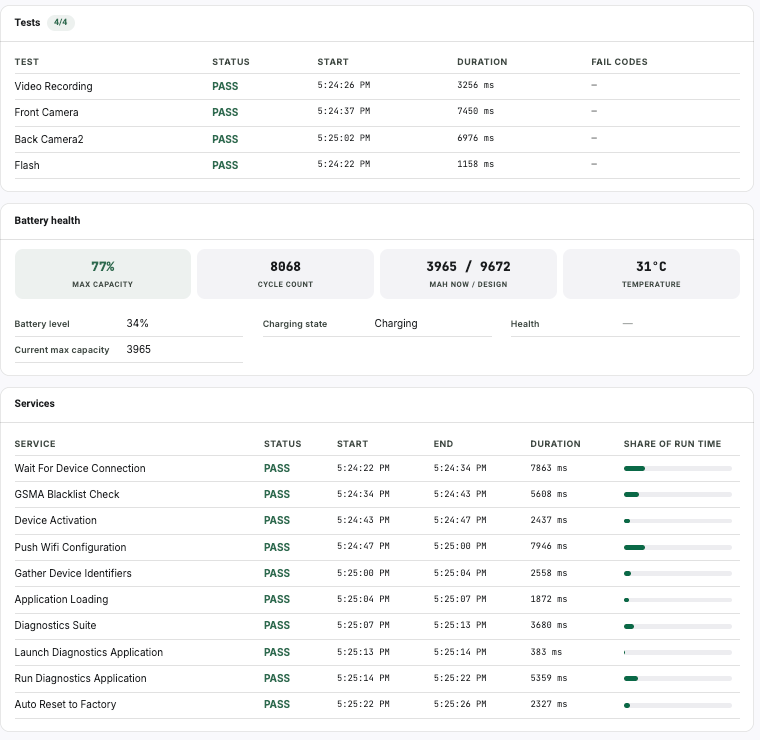
Aggregates are for the plant manager. When a customer disputes a single unit, the platform has to produce that unit's own record — every test, every service, every millisecond of it.
Audit-by-test and failed-test detail are available for today only. The dashboard will compare any two days, ranges, teams, shifts, lines, operators or levels you like — but the test-level breakdown behind a failure is a live view of the current day, not an archive you can walk backwards through.
We publish that because the alternative is you finding it in week three of a trial. Historical runs, results and exports are all retained; it is the per-test audit drill-down that is day-scoped.
How it deploys.
iOS and Android
On-premise and cloud/remote
SDK available for white-labeling
Let's talk about your business needs. Send us an email at info@assetscience.com.
Mission and vision.
Mission
To democratize enterprise-grade device diagnostics, making battle-tested software accessible to every refurbisher — not just those who can afford million-dollar contracts.
Vision
A world where every refurbished device is certified with full transparency, building consumer trust and accelerating the circular economy.
Put it on a bench and see.
Run your own devices through it, on your own floor, against your own grading scale. No credit card, and no sales call before you start.